语句
goto
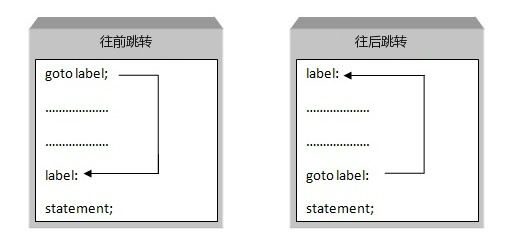
C 语言中的 goto 语句允许把控制无条件转移到同一函数内的被标记的语句。
**注意:**在任何编程语言中,都不建议使用 goto 语句。因为它使得程序的控制流难以跟踪,使程序难以理解和难以修改。任何使用 goto 语句的程序可以改写成不需要使用 goto 语句的写法。
C 语言中 goto 语句的语法:
goto label;...label: statement;在这里,label 可以是任何除 C 关键字以外的纯文本,它可以设置在 C 程序中 goto 语句的前面或者后面。
#include <stdio.h>
int main (){   /* 局部变量定义 */   int a = 10;
   /* do 循环执行 */   LOOP:do   {      if( a == 15)      {         /* 跳过迭代 */         a = a + 1;         goto LOOP;      }      printf("a 的值: %d\n", a);      a++;
   }while( a < 20 );
   return 0;}
花括号初始化列表
跳转到“花括号初始化列表”| 序号 | 初始化类型 | 说明 | 示例代码 |
|---|---|---|---|
| 1 | 基本数据类型初始化 | 使用花括号初始化基本数据类型 | int a{10}; |
| 2 | 对象列表初始化 | 初始化容器对象,包含一系列元素 | std::vector<int> v{1, 2, 3, 4}; |
| 3 | 类成员初始化 | 初始化类的成员变量 | Example ex{10, 20.5}; |
| 4 | 使用构造函数初始化 | 通过构造函数进行初始化 | Example ex{10, 20.5}; |
| 5 | std::array初始化 | 初始化固定大小数组 | std::array<int, 5> arr{1, 2, 3, 4, 5}; |
| 6 | std::pair初始化 | 初始化一对元素 | std::pair<int, double> p{1, 2.5}; |
| 7 | 容器的就地初始化 | 直接初始化容器对象,无需使用花括号 | std::vector<int> v = {1, 2, 3, 4}; |
| 8 | 聚合类型初始化(C++17) | 初始化聚合类型,即所有成员都是公共的、默认可访问的 | Aggregate agg{10, 20.5}; |
| 9 | 类类型使用默认构造函数初始化 | 使用默认构造函数初始化类对象 | MyClass obj{}; |
| 10 | 使用make_shared或make_unique进行初始化 | 使用智能指针构造函数进行初始化 | std::shared_ptr<int> sharedInt = std::make_shared<int>{10};std::unique_ptr<MyClass> uniquePtr = std::make_unique<MyClass>(); |
// 对象实例化MyClass obj(参数列表);auto obj = MyClass(参数列表);// 统一初始化语法auto 变量名{构造函数(参数列表)};auto input_image{util::RGBImageReader(input_filename, input_dims, mean, stddev)};开辟内存
跳转到“开辟内存”auto buffer = std::unique_ptr<float>{new float[10]};语句解释
跳转到“语句解释”1)
struct PPM {    int magic; // 用于存储图像格式的魔法数字    int w;     // 图像的宽度    int h;     // 图像的高度    int max;   // 图像数据中的最大颜色值};
infile >> mPPM.magic >> mPPM.w >> mPPM.h >> mPPM.max;
/*
1. `infile`: 这是一个输入流对象,通常是一个 `std::ifstream` 对象,它表示一个输入文件流。它用于从文件中读取数据。2. `>> mPPM.magic`: 这部分代码从 `infile` 中读取数据,并将其存储在 `mPPM` 结构体的 `magic` 成员中。`magic` 成员可能是一个用于表示某种特定格式的标记或代码。3. `>> mPPM.w`: 这部分代码从 `infile` 中读取数据,并将其存储在 `mPPM` 结构体的 `w` 成员中。`w` 可能表示图像的宽度。4. `>> mPPM.h`: 这部分代码从 `infile` 中读取数据,并将其存储在 `mPPM` 结构体的 `h` 成员中。`h` 可能表示图像的高度。5. `>> mPPM.max`: 这部分代码从 `infile` 中读取数据,并将其存储在 `mPPM` 结构体的 `max` 成员中。`max` 可能表示图像数据中的最大颜色值,通常用于 PPM(Portable Pixmap Format)图像格式。
*/
2)
namespace Ui {class YOLOWINDOW;}/*namespace Ui是声明了一个名为Ui的命名空间。命名空间主要用于解决名称冲突的问题。
class YOLOWINDOW;是在Ui命名空间中前向声明了一个名为YOLOWINDOW的类。前向声明是一种声明类、函数或者变量的方式,它告诉编译器这个名字是有效的,后面的代码中可能会使用到这个名字。但是,前向声明并不会定义类、函数或者变量。*/
**前向声明(Forward Declaration)**只是告诉编译器,有一个指定的类、函数或变量存在,但并不提供具体的实现或定义。例如,class YOLOWINDOW;就是一个类的前向声明,它告诉编译器YOLOWINDOW是一个类的名字,但并没有提供这个类的任何细节,如成员变量和成员函数等。
int main(int argc, char **argv)int argc, char **argv 是 C 和 C++ 程序的标准命令行参数。它们用于从命令行接收参数。
argc是命令行参数的数量。argv是一个指向字符数组的指针,每个数组都包含一个命令行参数。argv[0]通常是程序的名称,argv[1]是第一个命令行参数,依此类推。
3)#pragma comment(lib, …)
#pragma comment 允许你在源代码中插入特定的注释,这些注释可以被编译器识别并采取相应的动作。当使用 lib 选项时,它指示编译器在链接时自动链接指定的库文件。Microsoft Visual C++ 编译器特有的预处理指令 #pragma comment 的用法之一
#pragma comment(lib,"Wsock32.lib")#pragma comment(lib,"Ws2_32.lib")4)宏定义解释
/////////////////////////// Synchronization Primitives ///////////////////////////////
#if !defined(_M_CEE)#ifndef OPENCV_DISABLE_THREAD_SUPPORTtypedef std::recursive_mutex Mutex;typedef std::lock_guard<cv::Mutex> AutoLock;#else // OPENCV_DISABLE_THREAD_SUPPORT// Custom (failing) implementation of `std::recursive_mutex`.struct Mutex {    void lock(){        CV_Error(cv::Error::StsNotImplemented,                 "cv::Mutex is disabled by OPENCV_DISABLE_THREAD_SUPPORT=ON");    }    void unlock(){        CV_Error(cv::Error::StsNotImplemented,                 "cv::Mutex is disabled by OPENCV_DISABLE_THREAD_SUPPORT=ON");    }};// Stub for cv::AutoLock when threads are disabled.struct AutoLock {    AutoLock(Mutex &) { }};#endif // OPENCV_DISABLE_THREAD_SUPPORT#endif // !defined(_M_CEE)

详细讲解语法
5)全局作用域
这种语法中的 :: 是 C++ 中的全局作用域解析运算符。它用于明确指示编译器在全局命名空间中查找 socket 函数。在某些情况下,可能存在多个同名函数,位于不同的命名空间中。使用::可以避免命名冲突,确保调用的是全局命名空间中的 socket 函数。
SOCKET sListen = ::socket(AF_INET, SOCK_STREAM, IPPROTO_TCP);// ::socket 确保调用的是全局命名空间中的 socket 函数,而不是其他可能同名的函数输入输出,文件操作
跳转到“输入输出,文件操作”格式化字符
跳转到“格式化字符”(1)字宽
这是字段宽度(Field Width),表示输出的最小字符数。如果输出的值不足该宽度,将使用空格进行填充。
#include <stdio.h>
int main() { double number = 3.1416; printf("%2.4lf\n", number); return 0;}%:这是格式化字符串的起始符号,用于指示输出的格式化操作。2:这是字段宽度(Field Width),表示输出的最小字符数。如果输出的值不足该宽度,将使用空格进行填充。.4:这是精度(Precision),表示输出浮点数的小数部分的位数。lf:这是长度修饰符(Length Modifier),用于指定浮点数的类型。在这里,lf表示double类型。
获取文件列表
跳转到“获取文件列表”方法1
#include <iostream>#include <vector>#include <filesystem>#include <opencv2/opencv.hpp>
namespace fs = std::filesystem;
std::vector<std::string> get_image_files(const std::string& folder_path) {    std::vector<std::string> image_files;    // 遍历文件夹中的所有文件    for (const auto& entry : fs::directory_iterator(folder_path)) {        // 检查文件是否是常规文件,并且是JPG格式        if (entry.is_regular_file() && entry.path().extension() == ".jpg") {            image_files.push_back(entry.path().string());        }    }    return image_files;}
void process_images(const std::vector<std::string>& image_files) {    for (const auto& file : image_files) {        cv::Mat image = cv::imread(file, cv::IMREAD_COLOR);    }}
int main() {    // 替换为你的文件夹路径    std::string folder_path = "D:/ObjectDataTools_tem/ObjectDatasetTools-master4/LINEMOD/thread33/JPEGImages";    auto image_files = get_image_files(folder_path);    return 0;}
方法2(文件遍历)
注释部分为linux操作系统。
#include <io.h>
// inline bool IsPathExist(const std::string& path)// {//     if (access(path.c_str(), 0) == F_OK) {//         return true;//     }//     return false;// }
inline bool IsPathExist(const std::string& path){    if (_access(path.c_str(), 0) != -1) {        return true;    }    return false;}
// inline bool IsFile(const std::string& path)// {//     if (!IsPathExist(path)) {//         printf("%s:%d %s not exist\n", __FILE__, __LINE__, path.c_str());//         return false;//     }//     struct stat buffer;//     return (stat(path.c_str(), &buffer) == 0 && S_ISREG(buffer.st_mode));// }
inline bool IsFile(const std::string& path){    if (!IsPathExist(path)) {        printf("%s:%d %s not exist\n", __FILE__, __LINE__, path.c_str());        return false;    }    struct _stat buffer;    if (_stat(path.c_str(), &buffer) != 0) {        return false;    }    return ((buffer.st_mode & _S_IFMT) == _S_IFREG);}

// inline bool IsFolder(const std::string& path)// {//     if (!IsPathExist(path)) {//         return false;//     }//     struct stat buffer;//     return (stat(path.c_str(), &buffer) == 0 && S_ISDIR(buffer.st_mode));// }
inline bool IsFolder(const std::string& path){    if (!IsPathExist(path)) {        return false;    }    struct _stat buffer;    if (_stat(path.c_str(), &buffer) != 0) {        return false;    }    return ((buffer.st_mode & _S_IFMT) == _S_IFDIR);}
int main(int argc, char** argv)    const std::string engine_file_path{argv[1]};    const std::string path{argv[2]};    // 文件路径
    std::vector<std::string> imagePathList;    bool                     isVideo{false};
    assert(argc == 3);
    auto yolov8 = new yolo(engine_file_path);    yolov8->make_pipe(true);
    if (IsFile(path)) {        std::string suffix = path.substr(path.find_last_of('.') + 1);        if (suffix == "jpg" || suffix == "jpeg" || suffix == "png") {            imagePathList.push_back(path);        }        else if (suffix == "mp4" || suffix == "avi" || suffix == "m4v" || suffix == "mpeg" || suffix == "mov"                 || suffix == "mkv") {            isVideo = true;        }        else {            printf("suffix %s is wrong !!!\n", suffix.c_str());            std::abort();        }    }    else if (IsFolder(path)) {        cv::glob(path + "/*.jpg", imagePathList);  // 用于获取指定目录下的所有文件(或满足特定模式的文件)    }
  return 0;}
头文件测试
跳转到“头文件测试”#include <opencv2/opencv.hpp>void test(void);// h2.cpptest(void){}
// h1.h# include "h2.h"#include <opencv2/opencv.hpp>
// h0.h# include "h1.h"
// main.h#include "h0.h"
// main.cpp#include "main.h"int main(){
test();}>> work
// h2.h
void test(void);// h2.cpp#include <opencv2/opencv.hpp>
// h1.h# include "h2.h"
// h0.h# include "h1.h"
// main.h#include "h0.h"
// main.cpp#include "main.h"int main(){ cv::Mat src; src = cv::imread("F:/code/projects/threadSeg_Yolo_RT/assets/0.png"); cv::imshow("rgb", src); cv::waitKey(0); cv::destroyAllWindows();}>> no work查看数据类型
跳转到“查看数据类型”typeid(output_size).name()